One platform for health tourism, from first enquiry to final follow-up
For dental, hair transplant and aesthetic clinics: leads, treatment plans and quotes, deposits, appointments and travel, collections, invoicing and post-treatment follow-up in one system. Examinations and medical records stay in your clinic software.
WhatsApp, Instagram, Messenger and web forms in one inbox
Quotes, acceptance and deposits in the patient's language
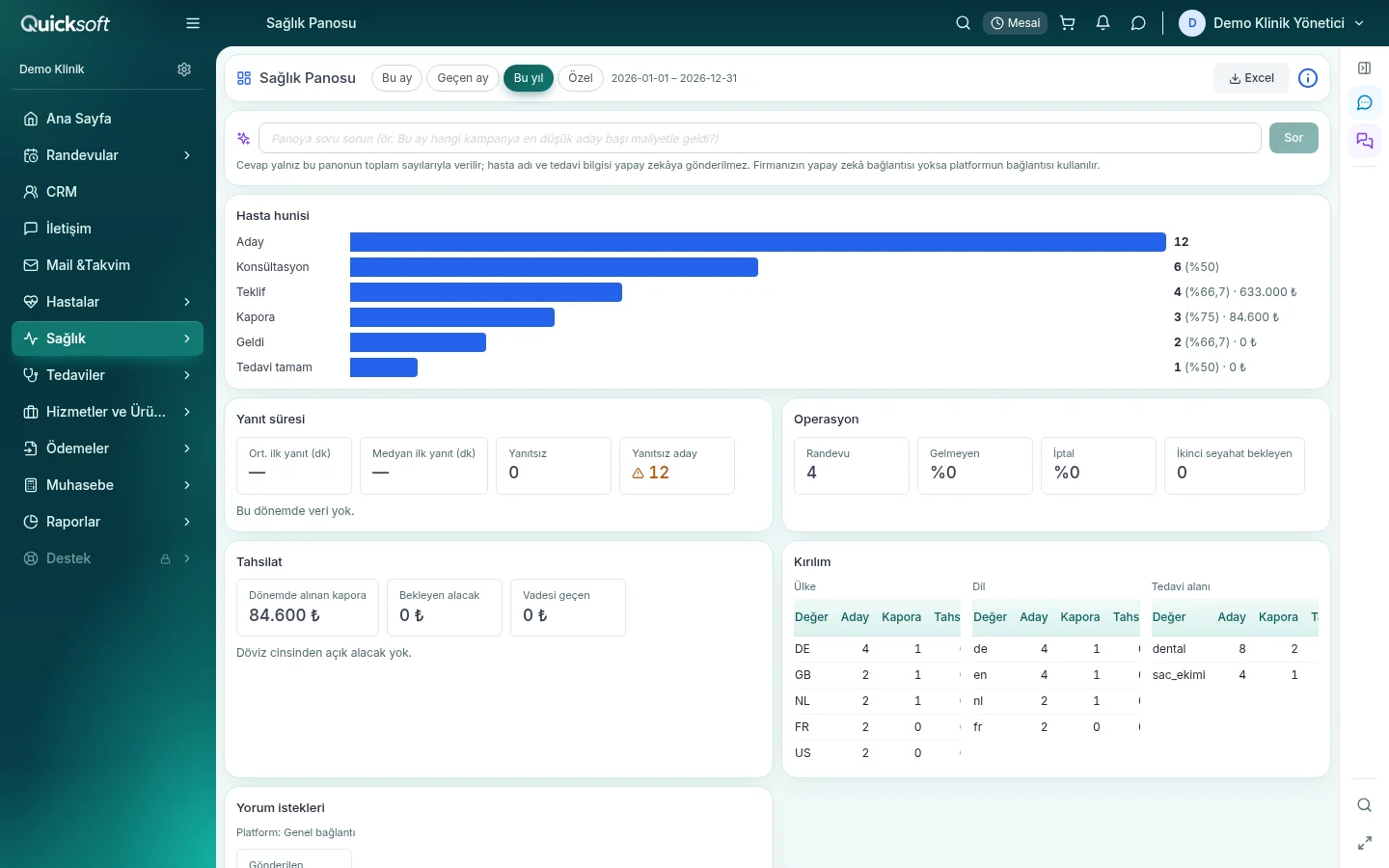
Health Dashboard: leads, consultations, quotes, deposits and collections on one screen (sample data)
One inboxWhatsApp, Instagram, Messenger, form
Quote and depositAccepted in the patient's language
JourneyFlight, hotel, transfer
After treatmentFollow-up, survey, check-up
Demo:clinic.quicksoft.trUsername: demo-klinik@example.comPassword: Demo2026Open the demo Read-only account, sample data
6 languages
Patient-facing form, booking, quote, consent, survey and review pages
3 treatment areas
Treatment plans for dental, hair transplant and aesthetics
3 reminders
On WhatsApp 7 days, 24 hours and 2 hours before the appointment
VAT Law 13/1-l
VAT-exempt invoices for foreign patients
Every step of the patient journey in the same record
From the first message to post-treatment follow-up, the patient, your team and collections move in one flow.
1
The enquiry arrives
Enquiries from WhatsApp, Instagram, Messenger and web forms land in the Patient Funnel as leads, with their source, language, country and treatment area on record.
2
First reply and follow-up
The lead is assigned to a team member who knows their language and treatment area. A welcome message goes out; a follow-up sequence writes again to leads who have not answered.
3
Pre-assessment
Photos, X-rays and documents are collected on the lead card and a review task is opened for the doctor. The online consultation link goes to the patient in their own language.
4
Treatment plan and quote
The plan is prepared on the dental chart or in the hair transplant and aesthetics plan editor; the quote comes from the plan, in the patient's language.
5
Acceptance, deposit and consent
The patient accepts the quote on the acceptance page and pays the deposit; they read the consent form in their own language and confirm it with a code.
6
Travel
Flight, hotel and transfer are planned on the Journey tab of the treatment process; a task is opened for the coordinator and arrival details go to the patient in their own language.
7
Treatment and collection
Each treatment moves forward linked to the doctor who performs it. Deposit, payment link, instalment and cash desk collections sit in the same record; foreign patients receive VAT-exempt invoices.
8
Follow-up and reviews
When treatment is completed, a follow-up message, a satisfaction survey and a check-up reminder go out in turn; a review invitation is sent on the day you choose.
QuickSoft Health in real screens
Screens are from the demo clinic; people and amounts are samples.
Every conversation in one inbox
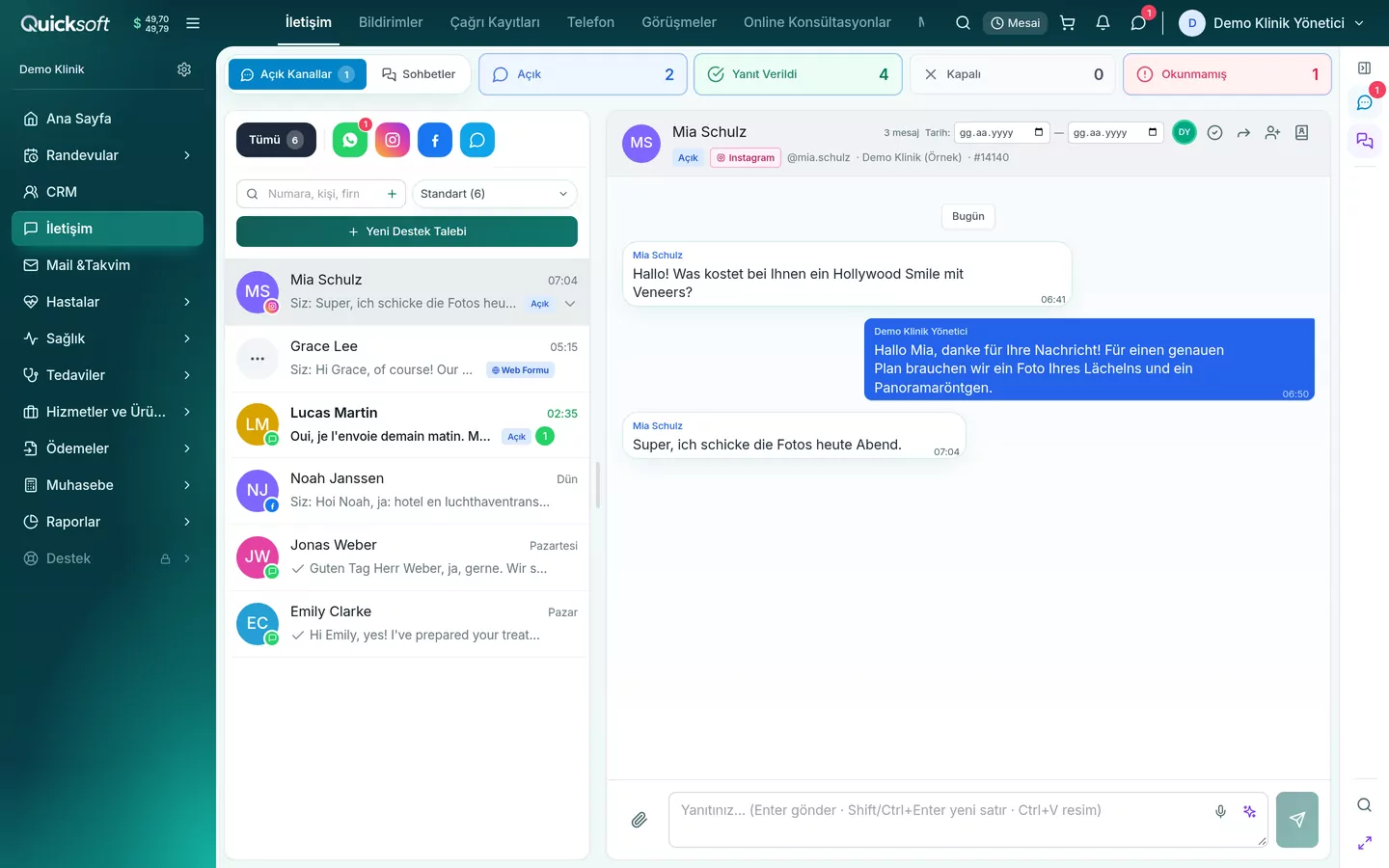
WhatsApp, Instagram, Messenger and web form conversations on the same screen; your coordinator writes to the patient from here.
Conversations go to a team member by language and treatment area
Message templates in the patient's language
AI can draft the first reply
Communication: an Instagram conversation in German (sample data)
All features
Everything a health tourism clinic needs day to day, in one system.
Leads and communication
WhatsApp, Instagram, Messenger and web forms in one inbox
Automatic assignment by language and treatment area
Welcome message and a follow-up sequence for leads who do not answer
AI draft for the first reply
Promotion consent and blacklist checks on bulk messages
Your clinic's own web form, in 6 languages
Consultation and appointments
Photos, X-rays and PDFs on the lead card
A review task for the doctor when the first file arrives
Online booking page in 6 languages
Online consultation: video meeting link to the patient in their own language
Appointment calendar with doctor columns and online requests
WhatsApp reminders 7 days, 24 hours and 2 hours before
Treatment plan and quote
Dental chart for dental treatment
Plan editor for hair transplant and aesthetics
Quote from the plan, in the patient's language
Acceptance, deposit and refund rule on the acceptance page
Consent form in the patient's language, confirmed with a code
Plan Follow-up and a reminder sequence
Travel and treatment process
The accepted quote becomes a treatment process
Each treatment is linked to the doctor who performs it
The process stage triggers messages to the patient
Flight, hotel and transfer; a task for the coordinator
Arrival details to the patient in their own language
Lab work; its cost goes into patient profitability
After treatment and reputation
Follow-up message after 1 day
Satisfaction survey after 7 days
Check-up reminders in the months you set
Messages at 10:00 the patient's local time, in their language
Review invitation on the day you choose: Google or Trustpilot
Verified Trustpilot invitations that follow the rules
Collections, invoicing and tax
Deposit, card payment link, instalment plan and cash desk
VAT-exempt invoices for foreign patients (VAT Law 13/1-l)
e-SMM drafts for private practices
Exempt Sales (334) report and VAT refund file
Foreign Patient Earnings List
Agency commission and doctor earnings reports
Management and reports
Health Dashboard: funnel, response time, collections
Breakdown by country, language and treatment
Coordinator and doctor performance
Patient profitability
Campaign return and cost per lead
If you turn it on, a summary by e-mail every morning
Team, setup and KVKK
Patient Coordinator, Doctor and Cash Desk role templates
Menus in healthcare language: Patients, Treatments, Services and Products
KVKK notice, promotion and photo consents with their history
Automatic patient messages in editable templates
The QuickSoft team sets up the health profile
A list of the remaining setup steps on the Home page
The health modules run on QuickSoft's accounting, e-Invoice and e-Archive, payment plan, bank transactions, mail and calendar infrastructure; which modules are active depends on your package.
Every page the patient sees, in their own language
Web form, online booking, quote acceptance, consent, satisfaction survey and review invitation in six languages. Messages to the patient are prepared in the same languages.
Turkish
English
German
French
Dutch
Russian
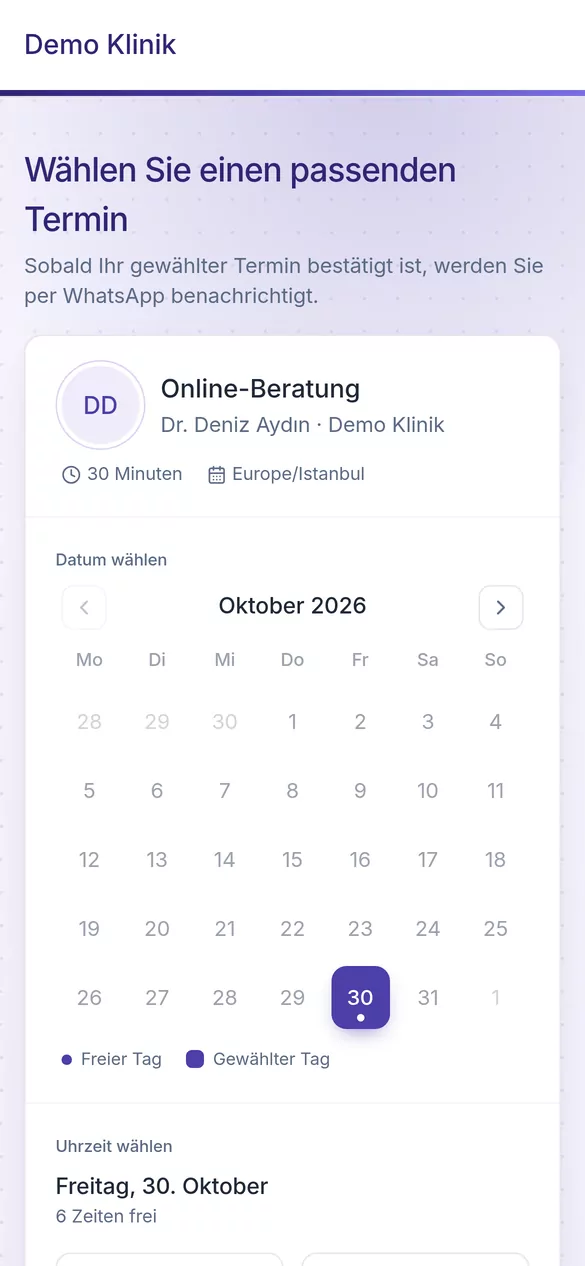
Online booking page (German, sample data)
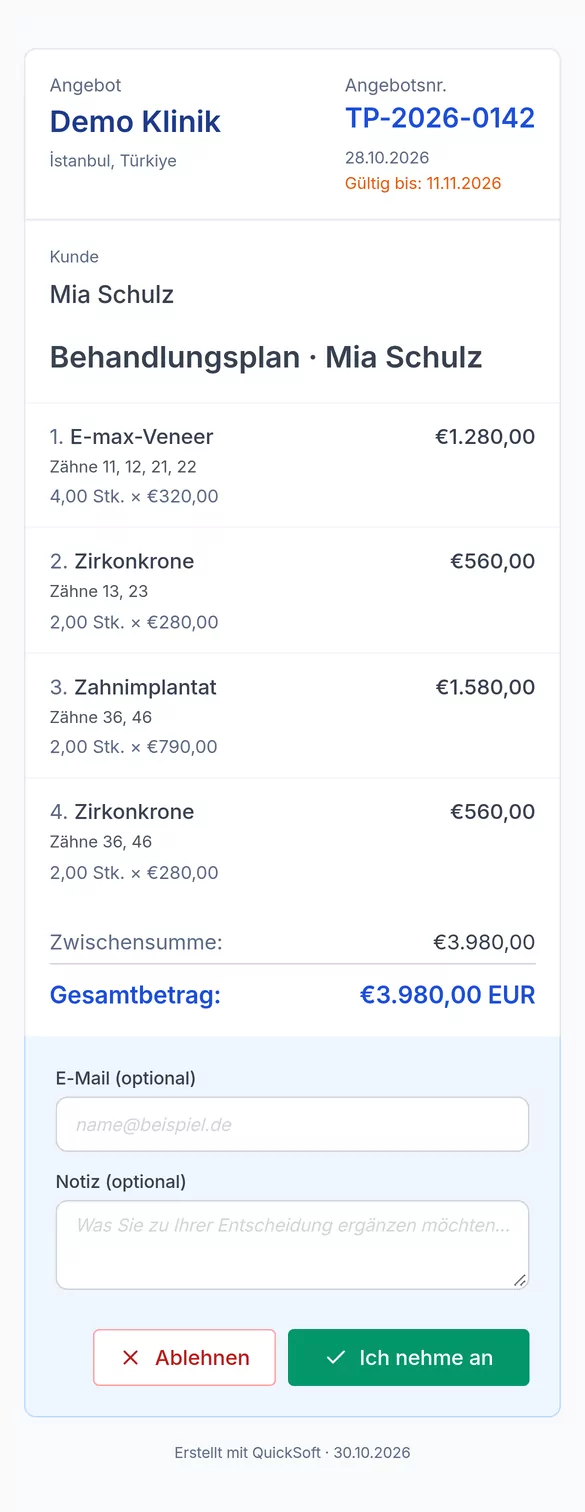
Quote acceptance page (German, sample data)
Patient reviews on Trustpilot, with invitations that follow the rules
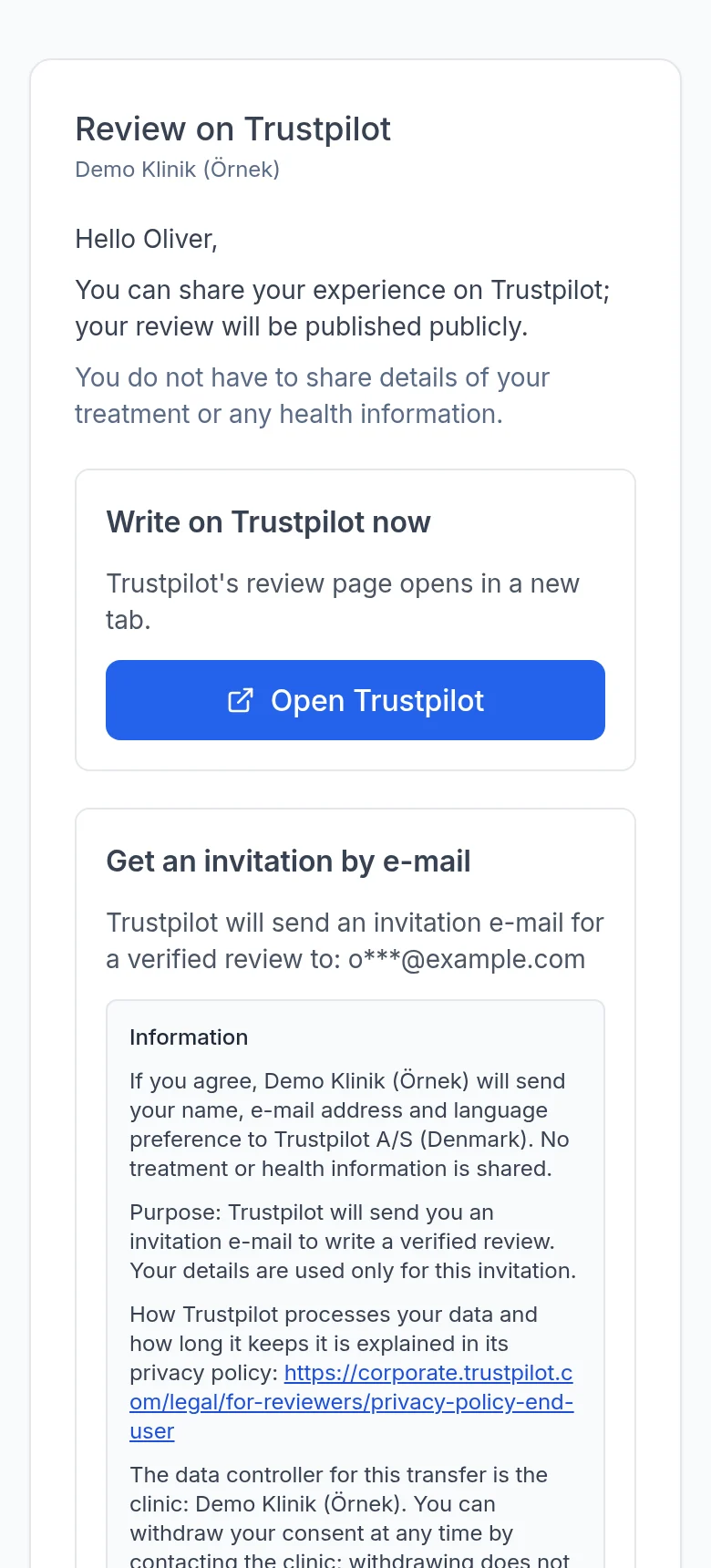
On the day you choose after the treatment is completed, the patient gets their own invitation page in their language on WhatsApp. They write on Trustpilot right away or, if they wish, get a verified invitation e-mail from Trustpilot.
Invitations that follow the rules
The invitation rule is the same for everyone: it goes the same way after the treatment is completed. No ratings are asked for, no incentives are given and no steering wording is used; there is no picking or excluding patients by hand.
Verified invitation
If the patient agrees, their name and e-mail are sent to Trustpilot, and Trustpilot sends them a verified invitation e-mail. No treatment or health information is sent.
Consent under KVKK
The invitation only goes to patients who gave promotion consent. The transfer to Trustpilot needs separate explicit consent; the consent text is shown in the patient's language, and the consent is recorded with a digest of the text shown and the time.
Measured in the Health Dashboard
You see the invitations sent, the patients who opened the page, went to Trustpilot or got a verified invitation, together with the reasons for invitations not sent.
The patient's invitation page: two equal options, no stars and no steering (sample data)
Working within the rules
Consent, treatment consent, invoicing and tax rules work inside the daily flow.
KVKK consents
Privacy notice, promotional message and photo use consents are kept separately with their history; bulk messages follow promotion consent and the blacklist.
Consent form
The treatment consent is shown to the patient in their own language and confirmed with a code; the confirmation is kept on record.
Invoices for foreign patients
The VAT-exempt invoice for a foreign patient (VAT Law art. 13/1-l), with the legal reference: from İşNet or Turkcell, or with your e-invoice provider. The lists for your VAT refund file are ready.
e-SMM for private practices
An e-SMM draft is prepared from the collection; it is sent through İşNet.
Tax reports
The Exempt Sales (334) report and the Foreign Patient Earnings List are ready; the VAT refund file is downloaded from the 334 report.
Incentive application file
QuickSoft prepares your application file for the Ministry of Trade's service export supports (Decision No. 10962): foreign patient and flight ticket lists, ad spend and click reports by country, invoice and payment matching.
Your organisation submits the application and the Ministry decides; QuickSoft does not guarantee that support will be granted.
Which work runs where
QuickSoft does not replace your clinic software. Examinations and medical records stay there; finding, convincing, bringing in and collecting from the patient happen in QuickSoft.
Leads, advertising, WhatsApp and the sales funnel
Your clinic softwareNo
QuickSoftYes
Pre-assessment, treatment plan, quote, approval, deposit and consent
Your clinic softwareNo
QuickSoftYes
Patient record
Your clinic softwareThe accepted patient is entered into the clinical record
Invoicing, collection, payment plans, accounting, bonuses and agency commissions
For information, if available
Yes
Management reports: funnel, return, profitability
Clinical reports
Yes
Your clinic software stays in place
Clinical records, examinations and e-Nabız stay in your clinic software. You can see the current status of connections with clinic software on a separate page.
In a 30-minute call we walk through your clinic's patient flow together on real screens.
2
Setup
The QuickSoft team sets up the health profile: Patient Funnel, treatment process stages, message templates, follow-up sequences, role templates and menu layout.
3
Connect your channels
Connect your WhatsApp, Instagram and Messenger accounts and your web form; the setup list on the Home page shows the remaining steps.
Frequently asked questions
Does QuickSoft Health replace our clinic software?
No. Examinations, diagnoses, treatments performed, X-rays, e-Nabız and e-Prescription stay in your clinic software. QuickSoft runs the work from winning the patient to collecting payment and post-treatment follow-up.
Which languages does it work in?
Patient-facing pages and messages to the patient are prepared in Turkish, English, German, French, Dutch and Russian.
Does it connect to our ad accounts?
Ad spend is uploaded with Meta's and Google's export files. Campaign return is calculated from leads' deposits and collections, using real accounting data.
Do you guarantee that we will receive incentives?
QuickSoft prepares your application file for the Ministry of Trade's service export supports (Decision No. 10962): foreign patient and flight ticket lists, ad spend and click reports by country, invoice and payment matching. Your organisation submits the application and the Ministry decides; QuickSoft does not guarantee that support will be granted.
How do we invoice a foreign patient?
The VAT-exempt invoice for a foreign patient (VAT Law art. 13/1-l), with the legal reference: from İşNet or Turkcell, or with your e-invoice provider. The lists for your VAT refund file are ready.
Who does the setup?
The QuickSoft team sets up the health profile. After you connect your channels, the setup list on the Home page shows the remaining steps.
See QuickSoft Health with your own clinic's workflow
In a 30-minute live demo we show your clinic's patient flow on real screens.